
Clear audio is no longer a luxury — it’s essential. In 2026, conference rooms are becoming the hub for video meetings, hybrid teamwork, and remote collaboration. If your microphone doesn’t capture voices clearly, meetings quickly become frustrating and unproductive.
A good conference room microphone ensures everyone can hear and be heard, whether they’re sitting at the table or joining from afar. The right mic helps reduce echo, block out background noise, and make your meeting experience sound more professional.
In this guide, you’ll find the best conference room microphones that people are actually using today.
The Importance of High-Quality Sound in Conference Rooms
Clear audio is key to successful conferencing. Poor sound quality can lead to miscommunication and lower productivity. To improve your meetings, especially in rooms with multiple people, a good microphone system is essential.

- Ensure everyone can hear: No matter the room size, a quality microphone makes sure every voice is heard clearly.
- Block out background noise: Many advanced mics feature noise cancellation, keeping your conversation free of interruptions.
- Enhance virtual meetings: With more hybrid work, it’s crucial to have a mic that works well with video conferencing platforms like Zoom, Teams, or Skype.
- Some advanced microphones offer a real-time translation feature. This helps bridge language gaps during international meetings. It ensures everyone can communicate clearly, no matter where they’re from.
The perfect microphone is more than just sound quality. It also helps facilitate smooth brainstorming sessions by ensuring everyone’s voice is clearly heard.
Note: We may earn a small commission at no additional cost if you purchase through these links.
Top Conference Room Microphones People Are Using in 2026
Here are some well-regarded, popular conference phones, from budget-friendly to professional AV systems.
- Anker PowerConf S500
- Yealink CP900
- TONOR USB Conference Microphone
- Jabra Speak 750 UC
- Poly Sync 60
- Logitech Rally Mic Pod
- Bose Videobar VB1
- Sennheiser TeamConnect Ceiling 2
01. Anker PowerConf S500
Best Overall Conference Mic
The Anker PowerConf S500 is one of the most versatile and popular conference speakerphones available. It’s designed to provide clear, professional sound for meetings, hybrid work, and team collaborations.
Whether everyone is around the same table or across the room, it delivers exceptional audio quality. It’s perfect for screen sharing, team meetings, video calls, hybrid meetings, and teams that need both wireless and wired connectivity.
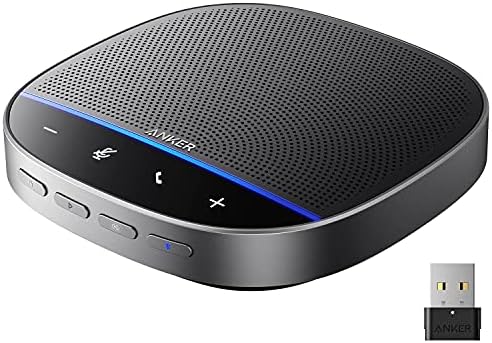
- 360° Voice Pickup: Get clear sound quality for everyone around the table with four microphones that pick up and amplify voices from all directions.
- VoiceRadar™ Technology: The Voice Tracker Array Microphone automatically locates the talker and electronically steers a listening beam toward them, enhancing sound fidelity and signal-to-noise performance.
- Versatile Connectivity: USB-C, Bluetooth, and a wireless 2.4 GHz USB Adapter help you connect to your computer, tablet, and smartphone; Compatible with Windows, macOS, iOS, and Android systems.
- Pair Multiple Units: If you have a larger room, pair up to 2 S500S units to expand sound coverage.
- 16hrs Ultra-Long Playtime: A powerful rechargeable battery provides up to 16 hours of continuous wireless listening on a single charge.
| Pros | Cons |
|---|---|
| ✔ Excellent audio clarity | ✘ Slightly higher price than basic speakerphones |
| ✔ Works with Zoom, Teams, Google Meet | |
| ✔ Expandable coverage | |
| ✔ Easy wireless setup |
02. Yealink CP900
Best Wireless Conference Mic
The Yealink CP900 is a great speakerphone with both USB and Bluetooth connectivity, plus strong audio pickup. It’s perfect for small to midsize conference rooms or portable use.
It’s especially useful in rooms where people frequently switch devices or need wireless flexibility.

- Bluetooth & USB Modes: Seamlessly connect to laptops, tablets, and phones via Bluetooth or USB.
- Omnidirectional Mic Array: Captures sound in 360 degrees.
- Full-duplex audio: Allows both speakers to speak simultaneously without interruptions.
- Compact and Portable: Its lightweight, compact design allows it to fit in meeting rooms of all sizes.
| Pros | Cons |
|---|---|
| ✔ Bluetooth support | ✘ Not ideal for large rooms |
| ✔ Clean cable-free setup | |
| ✔ Good voice pickup | |
| ✔ Portable |
03. TONOR USB Conference Microphone
Best Budget Option Conference Mic
The TONOR microphone has an omnidirectional pickup pattern that captures sound from all directions within an 11.5-foot range. This makes it an affordable, plug-and-play option for small teams or remote workers.
- USB Plug-and-Play: It connects to the network without software installation, so you can plug it in and use it immediately.
- Omnidirectional Pickup: This speakerphone is designed to capture all incoming calls. This provides video and Audio for video conferencing in apps like online meetings.
- Clear Sound: If you do a lot of conference calls with a group, these provide noticeably clearer Audio. They perform far better than the built-in microphones on most laptops.
| Pros: | Cons: |
|---|---|
| ✔ Very affordable | ✘ Limited range — best for small rooms |
| ✔ Easy setup | |
| ✔ Great for laptops |
04. Jabra Speak 750 UC
Best Mic for Professional Video Conferencing
The Jabra Speak 750 is perfect for businesses and professionals who need a reliable conferencing microphone. It delivers clear, rich audio and is certified for seamless use in business settings.
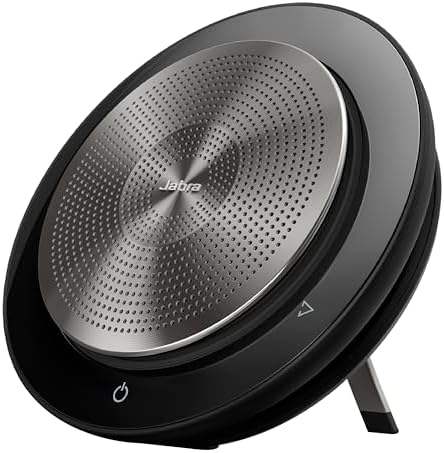
- Premium Speaker Quality: Delivers crisp Audio from both the microphone and the speaker.
- USB & Bluetooth Connectivity: Works with laptops, phones, and tablets.
- Platform Certifications: Certified for Microsoft Teams and Zoom — meaning smoother integration and consistent performance.
| Pros | Cons |
|---|---|
| ✔ Certified for Teams/Zoom | ✘ A bit more expensive than basic speakerphones |
| ✔ Great speaker output | |
| ✔ Solid voice pickup | |
| ✔ Works with multiple devices |
05. Poly Sync 60
Best Portable Conference Mic
The Poly Sync 60 is a portable conference speakerphone that combines excellent audio performance with security and convenience. It’s great for teams that often meet in separate rooms or travel a lot.
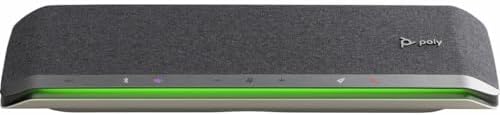
- Bluetooth + USB: Flexible connectivity for laptops, tablets, and smartphones across different work setups.
- Smart Noise Blocking: Actively reduces background noise to keep calls clear and focused.
- Portable Size: Compact and lightweight design for easy carrying between meetings and workspaces.
| Pros | Cons |
|---|---|
| ✔ Small and portable | ✘ Not a desktop powerhouse — better for smaller groups |
| ✔ Smart background noise suppression | |
| ✔ Good wireless range |
06. Logitech Rally Mic Pod
Best Modular Conference Audio System
The Logitech Rally Mic Pod adds modular flexibility to conference audio. It works especially well when paired with Logitech Rally systems. You can add multiple mic pods to cover larger meeting spaces.

- Scalable: Additional voice pickup units can be added easily as needed.
- Compatible with Rally Systems: Works with Logitech audio/video equipment for large rooms.
- Excellent Clarity: Powerful, professional pickup.
| Pros: | Cons: |
|---|---|
| ✔ Modular and scalable | ✘ Requires a Rally system base unit |
| ✔ Excellent audio clarity | |
| ✔ Works with professional AV gear |
07. Bose Videobar VB1
Best All-In-One Conference System
The Bose Videobar VB1 is an all-in-one unit that combines microphones, speakers, and a camera. It’s designed to fit seamlessly into any workspace, no matter how simple or stripped-down the room is. With intelligent noise rejection, it ensures clear sound.
The VB1 focuses on voice clarity, identifying and highlighting the speaker while reducing ambient noise. In professional settings, it offers a clean, space-saving look.

- Integrated Components: According to Crestron, this device combines a microphone, speaker, and camera into one compact unit for front-of-room conferencing.
- Advanced Noise Rejection: It is designed to provide clear Audio by focusing on voices and reducing background noise.
- Modern Design: Offers a clean, professional appearance.
| Pros | Cons |
|---|---|
| ✔ All-in-one solution | ✘ Higher price point |
| ✔ Premium sound quality | |
| ✔ Simplifies room setup |
08. Sennheiser TeamConnect Ceiling 2
Best Mic for Large Conference Rooms
The Sennheiser TeamConnect Ceiling 2 is ideal for those who prefer a ceiling-mounted beamforming microphone. It offers flawless audio quality while keeping things neat and tidy.
Its autofocus feature automatically recognizes and follows whoever is speaking. The Ceiling 2 is perfect for rooms that require wide audio coverage, thanks to its widebeam technology.

- Ceiling: Set up the OD for table-clear, complete opposition resistance.
- Dynamic Beamforming: Automatically tracks and follows active speakers in real time.
- Broad Room Coverage: Provides wide audio coverage, making it ideal for boardrooms and large meeting halls.
| Pros | Cons |
|---|---|
| ✔ Automatic voice tracking | ✘ Professional installation required |
| ✔ Excellent coverage | ✘ Premium price |
| ✔ Professional AV standard |
Which Product Is Best for You? Quick Guide
| Use Case | Best Choice | Why |
|---|---|---|
| Everyday Meetings | Anker PowerConf S500 | Best balance of features and ease |
| Wireless Flexibility | Yealink CP900, Poly Sync 60 | Great for flexible rooms |
| Budget Solutions | TONOR USB Mic | Affordable and effective |
| Professional Video Conferencing | Jabra Speak 750 | Certified for Teams/Zoom |
| Large Rooms / AV Systems | Logitech Rally Mic Pod | Scalable and modular |
| Premium Boardrooms | Shure MXA310 | Professional clarity |
| All-in-One AV | Bose Videobar VB1 | Audio + video in one device |
| Large Built-In Solutions | Sennheiser TeamConnect Ceiling 2 | Best coverage for professional spaces |
Choose the Right Microphone for Your Conference Room
When choosing a conference room microphone, consider these key factors:
- Room Size and Arrangement: Larger rooms require microphones with a wider pickup range, or sometimes multiple microphones to capture everyone clearly. Smaller rooms might only need a tabletop or wireless microphone.
- Wired vs. Wireless: If you want freedom from cables and less clutter, a wireless microphone is a great option. However, wired microphones usually offer better overall sound quality.
- Compatibility: Make sure the microphone is compatible with your video conferencing tools and any other technology in your meeting room.
- Features: Look for enhancements to sound quality, such as noise cancellation, echo suppression, and automatic gain control.
Below are reliable options that offices and professionals commonly use today.
Conference Room Microphone Placement Tips

- Place tabletop mics in the center of the table.
- Avoid placing mics near laptops or air vents.
- Follow spacing guidelines for the ceiling microphone.
- Always test the audio before an essential meeting.
If you’re also interested in microphones for specific uses, such as recording an instrument like a violin. You can explore our detailed guide to the best microphones for recording a violin.
Frequently Asked Questions
Q. Are wireless conference microphones reliable?
Yes, Modern wireless conference microphones are widely used and reliable for professional meetings.
Q. Do I need more than one microphone?
Small rooms usually need one mic. Large rooms often need multiple or ceiling-mounted systems.
Q. Can I use a regular microphone for conference calls?
Regular microphones are not designed for group conversations and usually produce poor results.
Final Thoughts
Choosing the best conference room microphone for clear sound in 2026 is simple. Focus on room size, sound clarity, and ease of use — not just flashy marketing features.
The microphones listed above are trusted, widely used, and suitable for most meeting environments. With the right microphone, your business meeting will sound clearer, feel more professional, and run more smoothly.
⟳ Posted on Jan 01, 2026

We recently upgraded our office meeting setup, and this guide helped narrow down the best options. Clear voice pickup is a lot more important than most people realize during client calls.
Great article overall. Thanks for mentioning background noise management, as it can get pretty hectic here in our office during the day. Definitely saving this one for later.
I was searching for a good conference room mic for zoom meetings and the comparison section was really helpful. The advantages and disadvantages made it easier to understand which model fits smaller rooms.